
wkhtmltopdf is deprecated: 2026 migration
For a decade, wkhtmltopdf was the default answer to “HTML to PDF on Linux”: a single binary, no browser to manage, one command. If you’re reading this, some cron job or CI step in your life probably still calls it.
The project is over. The GitHub repository is archived (read-only, no issues, no fixes); the last commit landed in November 2022 and the last release, 0.12.6, in 2020. The engine inside is Qt WebKit, frozen around 2015. And yet apt install wkhtmltopdf still works on Ubuntu 24.04, which is exactly why so many systems still quietly depend on it. This post is what it actually renders in 2026 (we tested it, as with everything in our HTML-to-PDF series), why “it still mostly works” is the trap, and how to migrate with the least drama.
What 0.12.6 renders in 2026
We ran the same two documents used across this series: a modern invoice (Flexbox, CSS Grid, woff2 font, inline SVG) and a Chart.js report. Chromium reference renders are in the PHP round.
The invoice came out better than we expected, and worse than you need:
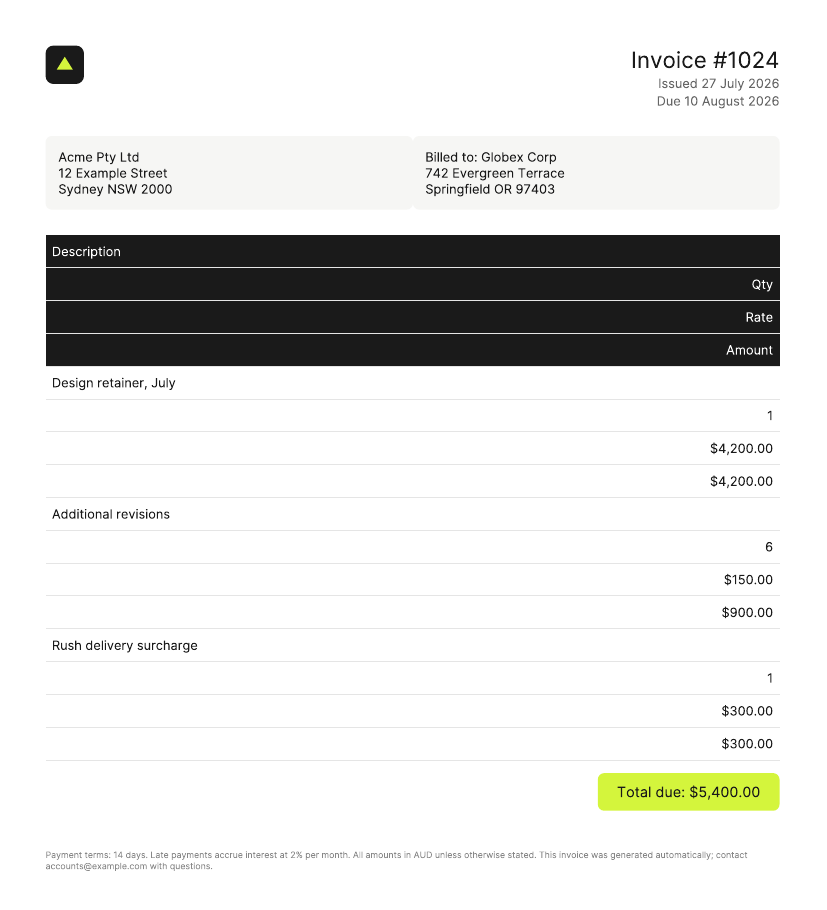
wkhtmltopdf’s invoice: close, until the line items. Download the PDF
The surprises on the good side: the Flexbox header and address blocks laid out correctly (old WebKit had an early flexbox implementation), the inline SVG logo rendered, and the woff2 web font loaded. Then the ceiling: the CSS Grid line items exploded into stacked full-width rows, the same failure dompdf and mpdf produce, because Grid postdates the engine. One page of HTML became two, in 2.9 seconds, and the output PDF weighs 212 KB where Chromium’s equivalent is 69 KB.
The chart report is the sharper lesson. wkhtmltopdf runs JavaScript, which was always its party trick over the pure libraries, so we gave it --javascript-delay 4000 and waited:
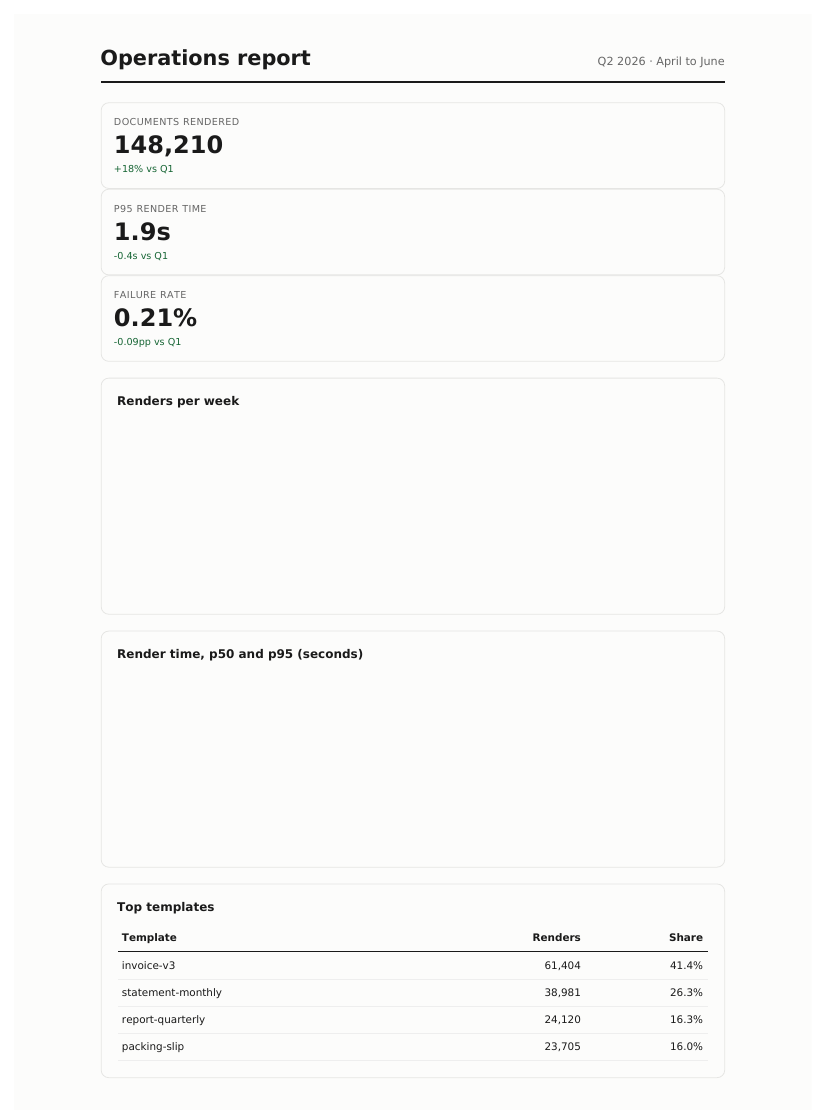
Four seconds of JavaScript delay, zero charts. Download the PDF
Empty chart panels anyway. A 2015 JavaScript engine can’t parse the modern syntax that Chart.js 4, and increasingly any current library, ships. Having a JS engine isn’t the same as having one from this decade: your --javascript-delay is real, the script just fails to parse before the delay even starts mattering.
Why “it still mostly works” is the trap
Three separate clocks are running against a frozen engine:
- CSS keeps moving. Grid is already broken; every stylesheet your team writes drifts further from what 2015 WebKit understands, and each new template becomes a negotiation with a renderer nobody is fixing.
- JavaScript already moved. Current builds of the chart and framework libraries you’d reach for don’t parse at all, as demonstrated above.
- Security stopped. An archived project means no patches, and wkhtmltopdf is a full (old) browser engine that parses HTML, CSS, images, and scripts. If any of that content is user-influenced, invoices with customer-supplied names are, you’re feeding untrusted input to an unpatched browser from 2015. This alone justifies the migration for most teams.
The flag-by-flag migration map
The pleasant surprise of migrating off wkhtmltopdf is that its mental model, URL in, PDF out, options as flags, maps almost one-to-one onto both self-hosted headless Chromium and the capture API:
| wkhtmltopdf | Puppeteer / Playwright | Capture API |
|---|---|---|
wkhtmltopdf URL out.pdf | page.goto(URL) + page.pdf() | POST /jobs with url |
--page-size A4 | format: 'A4' | page_size=A4 |
--orientation Landscape | landscape: true | landscape=true |
--margin-top 20mm (etc.) | margin: { top: '20mm' } | margin_top=2cm (etc.) |
--header-html / --footer-html | headerTemplate / footerTemplate | header_template / footer_template |
[page] / [topage] in headers | <span class="pageNumber"> / totalPages | same Chromium classes |
--javascript-delay 4000 | waitUntil: 'networkidle0' | wait_time=4 or wait_network=true |
--window-status done | page.waitForSelector(...) | wait_css_selector=... |
--username / --password | page.authenticate(...) | username / password |
--print-media-type (opt-in) | print media is the default | default (screen=true to flip) |
Two behaviour changes to expect, both improvements: Chromium uses print media by default (wkhtmltopdf made you ask with --print-media-type), and backgrounds need printBackground: true in Puppeteer (the API prints them by default; we verified).
Picking the destination
Where to land depends on what your documents need, and this series has tested each path with the documents above:
- Static documents, Python shop: WeasyPrint genuinely passed our modern-CSS test, and it’s the closest thing to wkhtmltopdf’s deploy story (a pip install, no browser). No JavaScript, though.
- PHP shop: the pure-PHP libraries are further behind than wkhtmltopdf itself, so your realistic destinations are a browser engine or the API.
- JavaScript-rendered content, or pixel fidelity: headless Chromium, self-hosted via Puppeteer or Playwright if you have the ops appetite (sandbox policies and all), with the full production checklist in our headless Chrome guide.
- The same result without running Chrome: the API. One request, the flag translations above, and the first 100 conversions a month are free to test the mapping:
# The wkhtmltopdf muscle-memory version:
#   wkhtmltopdf --page-size A4 --javascript-delay 4000 URL out.pdf
curl -u "$CONVERTERER_API_KEY:" https://api.converterer.com/jobs \
  -d url="https://yourapp.example/invoices/1024" \
  -d page_size=A4 \
  -d wait_network=true \
  -d file_name="invoice-1024.pdf"
However you migrate, do it before the next template redesign rather than after: the gap between what your designers write and what 2015 WebKit renders only ever widens, and the project maintaining the bridge went read-only three years ago.