
HTML to PDF in Python: WeasyPrint tested
This is the Python round of a series where we render the same two documents through every mainstream HTML-to-PDF option and publish exactly what comes out (the complete guide has the full scoreboard). The PHP round found all three PHP libraries stuck in 2011. Python’s story is more interesting, because one of its libraries has quietly caught up.
The test documents are the same as before, and you can download both: a modern invoice (Flexbox header, CSS Grid line items, woff2 web font, inline SVG logo) and a chart-heavy operations report (stat tiles, two Chart.js canvas charts, a summary table). The reference renders from headless Chromium and from the capture API are in the PHP post. Environment here: Python 3.12 on the same 1 GB VPS.
Results at a glance
| Renderer | Version | Time | Peak memory | Invoice | Charts |
|---|---|---|---|---|---|
| WeasyPrint | 69.0 | 1.06s | 60 MB | Near browser-parity | Empty boxes |
| xhtml2pdf | 0.2.17 | 0.23s | 75 MB | Layout collapsed | Empty boxes |
| Headless Chromium | 138 | ~4s cold | ~250 MB | Pixel-perfect | Fully drawn |
WeasyPrint: the good surprise
pip install weasyprint # needs Pango at the OS level: apt install libpango-1.0-0 libpangocairo-1.0-0from weasyprint import HTML
HTML(filename="invoice.html").write_pdf("invoice.pdf")We expected the same collapse we saw from dompdf and mpdf. Instead, WeasyPrint 69 rendered the modern invoice almost indistinguishably from Chrome: the Flexbox header sat side by side, the CSS Grid line items formed a proper four-column table, the inline SVG logo rendered, the woff2 web font loaded, and the lime total chip landed right-aligned where it belongs. One page, 1.06 seconds, 60 MB.
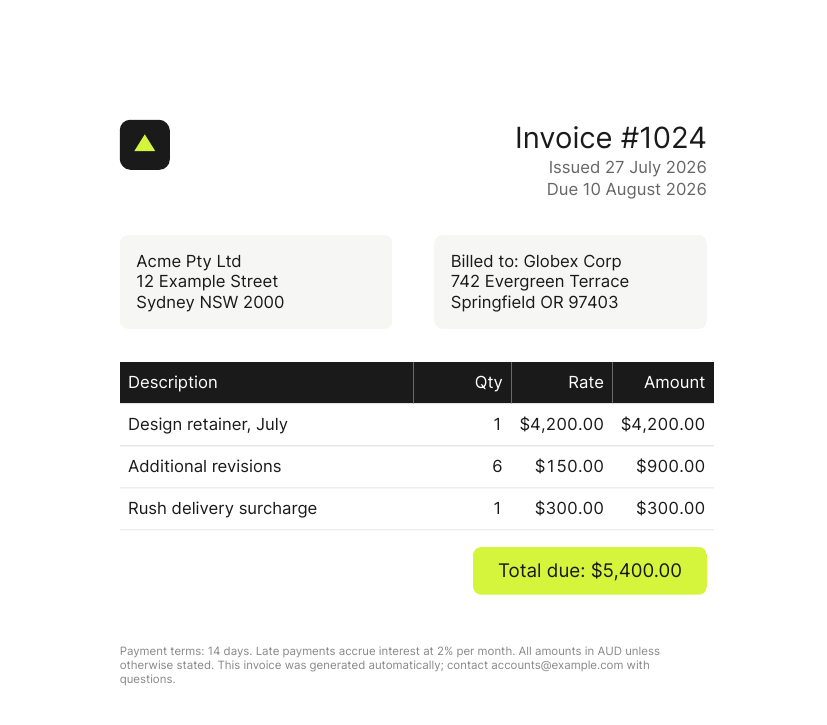
WeasyPrint’s invoice. Compare it against Chromium’s render. Download the PDF
This is not the WeasyPrint of five years ago. Flexbox support arrived in the v50s and CSS Grid landed in the v60s, and on our test document both simply worked. If your mental model of Python HTML-to-PDF is “libraries can’t do modern CSS”, WeasyPrint has genuinely outgrown that. Credit where due: it’s the only CSS-reimplementation library across PHP and Python that passed our modern-CSS test.
Two caveats we hit. It needs Pango installed at the OS level (a real constraint on locked-down hosts and some serverless platforms, and the most common installation complaint). And it’s the slowest of the libraries at about a second per document on our small box, which is still several times faster than launching a browser cold.
xhtml2pdf: skip it for new work
from xhtml2pdf import pisa

with open("invoice.html") as f, open("invoice.pdf", "wb") as out:
    pisa.CreatePDF(f.read(), dest=out)
xhtml2pdf builds on ReportLab, and its CSS support is roughly where dompdf’s is: the Flexbox header scattered down the page, the Grid line items exploded into full-width stacked rows, the SVG logo vanished, and one page became two. On the chart report it also printed “JSON Decode Error” twice to the console, its parser tripping over the Chart.js script tag, though it still produced a (chartless) PDF.
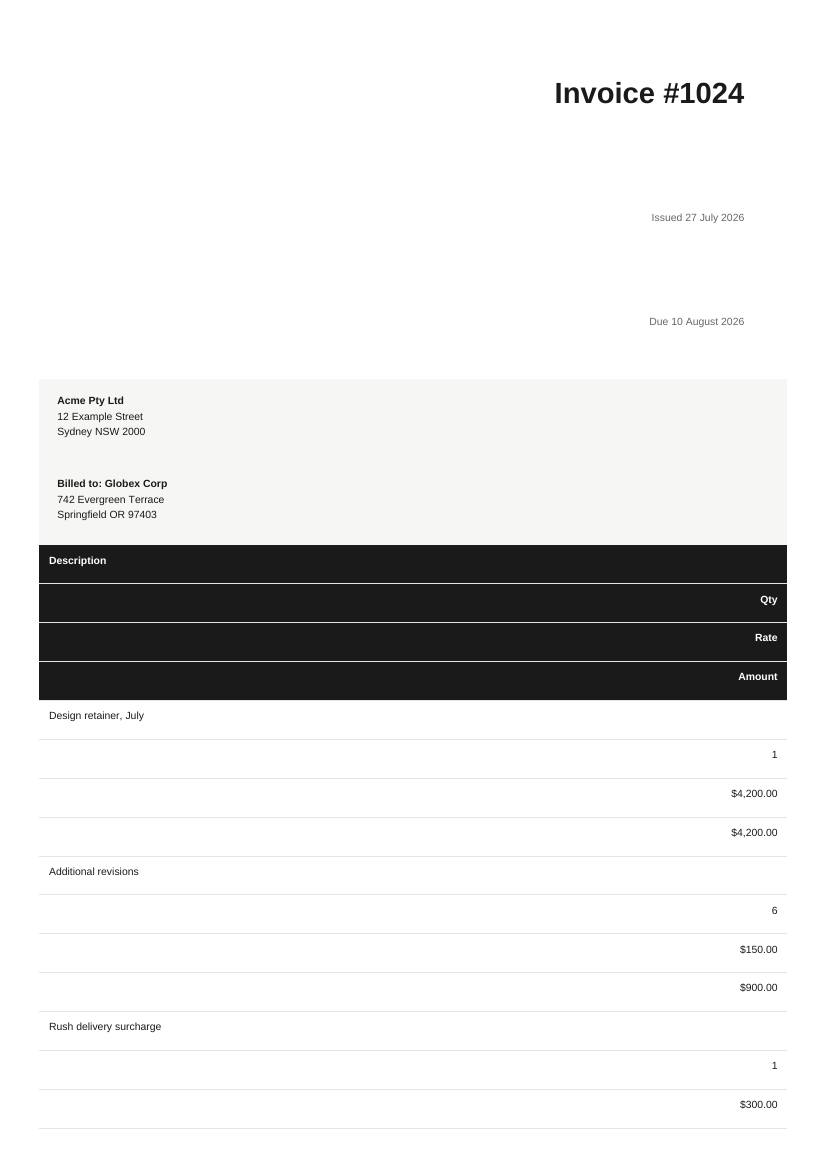
xhtml2pdf’s invoice, page 1 of 2. Download the PDF
It’s fast (0.23s) and pure-Python (no Pango dependency, which is its one genuine advantage over WeasyPrint for constrained environments), and it’s fine for the table-based, 2010-style templates we covered in the PHP post’s concession section. But if you’re choosing a Python library for HTML written this decade, WeasyPrint wins on every axis except install friction.
The ceiling: still no JavaScript
WeasyPrint’s modern-CSS support does not extend to running scripts, and the chart report makes the ceiling visible: stat tiles rendered perfectly in their grid row, the table came through clean, and both chart panels are empty boxes, because there’s no JavaScript engine and no canvas.
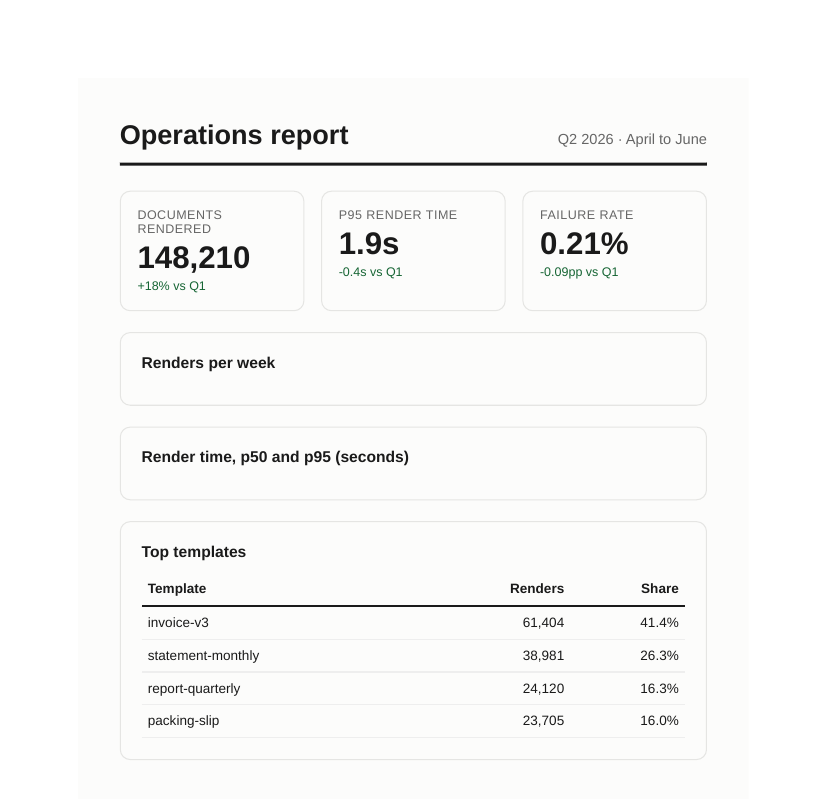
WeasyPrint’s report: everything except the charts. Download the PDF
So the honest Python decision tree has three branches, not two. Static documents with modern CSS: WeasyPrint, genuinely. Anything JavaScript-rendered, charts, client-side frameworks, anything a designer tests in a browser and expects to match: you need a browser engine.
The browser way in Python
Python’s route to headless Chromium is Playwright (pip install playwright && playwright install chromium, then page.pdf()), and everything from our guide to running headless Chrome in production applies: the ~130 MB binary, roughly 250 MB per concurrent render, font packages, process management, and a queue. On our 1 GB test box a cold browser render took about 4 seconds; WeasyPrint took one.
If the ops burden isn’t something you want to own, the API route is the same engine without the babysitting:
import os, requests

job = requests.post(
    "https://api.converterer.com/jobs",
    auth=(os.environ["CONVERTERER_API_KEY"], ""),
    data={
        "url": "https://yourapp.example/invoices/1024",
        "page_size": "A4",
        "file_name": "invoice-1024.pdf",
    },
).json()
# -> {"id": "fe748521-…", "status": "queued"}
# The finished PDF lands in your destination; a webhook fires when it's ready.
Plain requests, no SDK. Wait conditions for JavaScript-heavy pages (wait_network=true is what let the capture API draw the Chart.js report correctly), margins, page sizes, and header/footer templates are parameters on the same call; the website capture reference has the full list, and the free tier’s 100 conversions a month is enough to diff its output against your browser.
Choosing in one paragraph
Modern CSS but static content: WeasyPrint, which earned this recommendation by actually passing the test. Legacy table-based templates on a Pango-less host: xhtml2pdf works, but don’t start there. Charts, JavaScript, or “must match the browser exactly”: a real browser engine, self-hosted via Playwright if you want to run Chrome, or through the capture API if you don’t.