
HTML to PDF in Node: Puppeteer vs jsPDF
Third round of our hands-on HTML-to-PDF series, after PHP (all three libraries stuck in 2011) and Python (WeasyPrint surprised us). Node’s story is structurally different: the ecosystem’s default answer, Puppeteer, IS the browser, so there’s no fidelity contest to run. The contest is operational, and the most useful things we can publish are the numbers, the traps we hit on a real server, and what jsPDF, the most-searched library in this space, actually does.
Same two test documents as the whole series, downloadable here: the modern invoice and the Chart.js operations report. Environment: Node 24 on a 1 GB VPS.
Puppeteer: the native answer
npm install puppeteer # downloads its own Chromium (~130 MB)import puppeteer from 'puppeteer';
const browser = await puppeteer.launch();
const page = await browser.newPage();
await page.goto('file:///path/to/invoice.html', { waitUntil: 'networkidle0' });
await page.pdf({ path: 'invoice.pdf', format: 'A4', printBackground: true });
await browser.close();Output quality isn’t in question: it’s Chrome. Our invoice rendered pixel-identical to the desktop browser, and the chart report came out with both Chart.js charts fully drawn, because networkidle0 waits for the CDN script and the canvas work happens in a real JS engine.
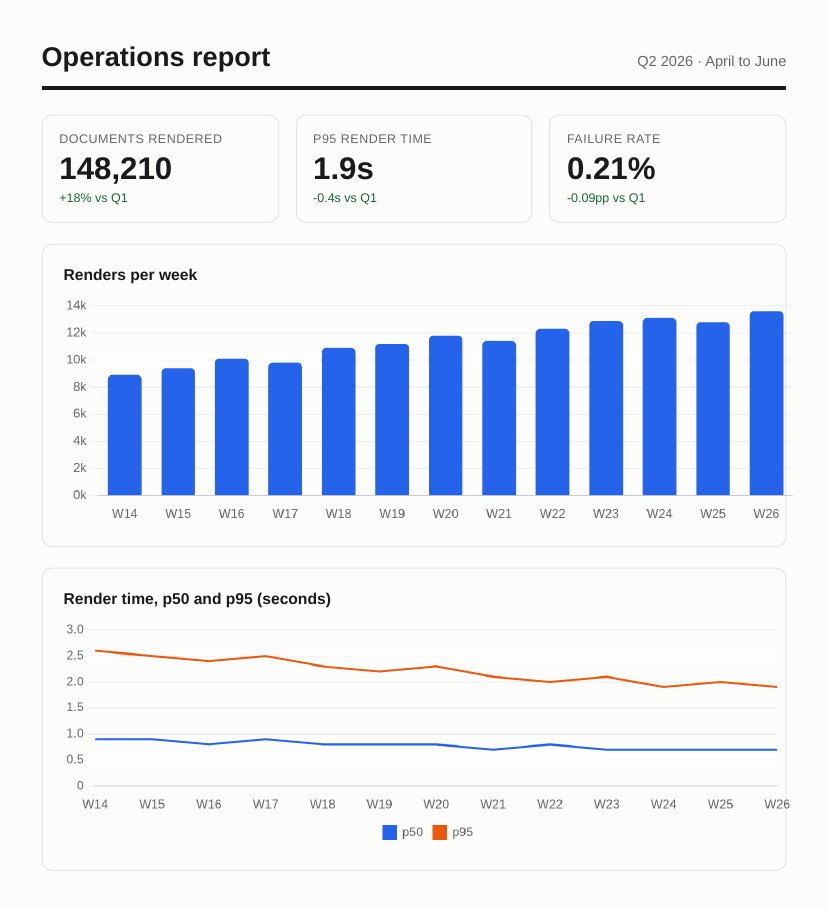
Puppeteer’s report render. Download the PDF, or the invoice one.
The measured costs on our small box: 5.7 seconds for the invoice and 8.3 for the report, cold, dominated by browser launch and CDN fetches (warm pages in a pooled browser render in well under a second). The Node process itself stayed under 40 MB; Chrome is a separate process that wants its ~250 MB. Two practical notes from the run: printBackground: true is off by default and its absence is the classic “where did my background colours go” bug, and networkidle0 is what saves your charts, at the cost of waiting on every straggling request.
The Ubuntu sandbox trap
Our first launch didn’t render anything. It crashed with this, and if you’re deploying Puppeteer to any recent Ubuntu you will meet it too:
FATAL:zygote_host_impl_linux.cc(128)] No usable sandbox! If you are
running on Ubuntu 23.10+ or another Linux distro that has disabled
unprivileged user namespaces with AppArmor...
Ubuntu 23.10 and later ship an AppArmor policy that blocks the unprivileged user namespaces Chrome’s sandbox needs. The commonly pasted fix is puppeteer.launch({ args: ['--no-sandbox'] }), which works (it’s how we produced the renders above) but removes the layer that contains a compromised renderer, a real consideration if you ever render HTML you didn’t write. The better fixes are an AppArmor profile for Chrome or rendering untrusted content in a throwaway container. Chromium’s own docs cover the options; just don’t cargo-cult --no-sandbox into production without deciding you mean it.
jsPDF: the wrong tool for this job
jsPDF is the most-searched PDF library in the JavaScript world, so it needs saying clearly: jsPDF does not convert HTML to PDF on a server. Its .html() method delegates rendering to html2canvas, which needs a browser DOM. Run it in Node and it dies immediately; here’s ours:
ReferenceError: document is not defined
    at .../node_modules/jspdf/dist/jspdf.node.min.js:303
That’s not a bug, it’s the design: .html() is for generating PDFs client-side, in your user’s browser, from the page they’re looking at. It’s genuinely good at that job (no server involved at all, which for some products is the whole point), with the trade-offs that the output is a rasterised approximation and the user’s browser does the work.
What jsPDF does do in Node is programmatic drawing:
import { jsPDF } from 'jspdf';

const doc = new jsPDF({ unit: 'mm', format: 'a4' });
doc.setFontSize(22);
doc.text('Invoice #1024', 190, 20, { align: 'right' });
doc.setFillColor(212, 245, 60);
doc.rect(120, 70, 75, 11, 'F');
doc.text('Total due: $5,400.00', 125, 77.5);
That ran in 0.02 seconds and produced a perfectly crisp PDF, but look at what the code is: coordinates. You’re not converting your invoice template, you’re re-drawing it by hand, and every layout change is arithmetic. It’s the PDFKit/ReportLab model, right for fully programmatic documents, wrong for “make this HTML a PDF”.
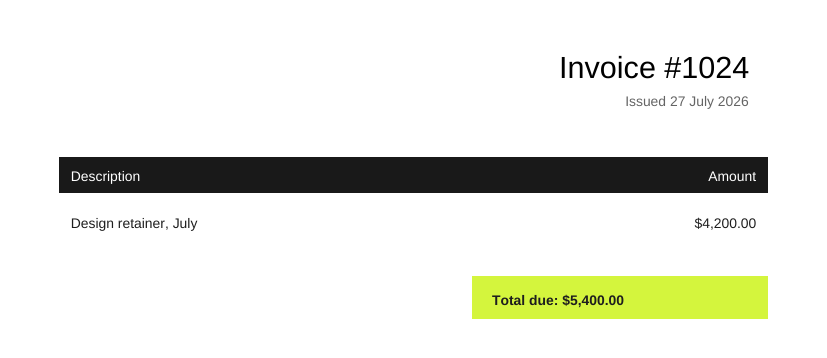
What 15 lines of coordinate-drawing buys you. Fine for some documents; it is not HTML conversion.
So the Node decision is purely operational
Unlike PHP and Python, Node has no meaningful CSS-reimplementation library to weigh: it’s Chrome or nothing. Which means the real question is whether you want to operate Chrome, and that’s a question about your ops appetite, not your language. The full checklist is in our production headless-Chrome guide: the binary, the memory per concurrent render, fonts, zombie processes, a queue, and now the AppArmor policy above. Worth it at steady volume with engineering time to spend; overhead everywhere else.
The API alternative is the same engine, minus the operating:
const res = await fetch('https://api.converterer.com/jobs', {
  method: 'POST',
  headers: {
    Authorization: 'Basic ' + Buffer.from(process.env.CONVERTERER_API_KEY + ':').toString('base64'),
    'Content-Type': 'application/x-www-form-urlencoded',
  },
  body: new URLSearchParams({
    url: 'https://yourapp.example/invoices/1024',
    page_size: 'A4',
    file_name: 'invoice-1024.pdf',
  }),
});
const job = await res.json();
// -> { id: 'fe748521-…', status: 'queued' }
Built-in fetch, no SDK. The wait_network=true parameter does for the API what networkidle0 did for Puppeteer above (that’s how it drew our Chart.js report correctly); the website capture reference lists everything else, and 100 free conversions a month is plenty to compare its output against your local Puppeteer.
Choosing in one paragraph
Client-side generation from the user’s own browser: jsPDF’s .html(), its actual job. Fully programmatic documents where code draws everything: jsPDF or PDFKit. Converting HTML on a server: Puppeteer if you’re set up to run Chrome properly (sandbox decisions included), or the capture API for the same rendering with none of the process management.