
HTML to PDF in PHP: dompdf, mpdf, TCPDF
Search “php html to pdf” and you get the same three Composer packages every time: dompdf, mpdf, and TCPDF. What you don’t get is a straight answer about what they can and can’t render, because most write-ups either paste the hello-world and stop, or were written before Flexbox existed.
So we did the obvious thing: wrote one realistic invoice template and rendered it through all three libraries, then through headless Chromium, on the same small server (PHP 8.1, 1 GB VPS). This post is what actually happened, including the fixes that work and the cases where a library is genuinely the right choice. (It’s the PHP round of a series: the Python round and Node round run the same documents through their ecosystems, and the complete HTML-to-PDF guide pulls every result together.)
The test document
A single-page invoice, written the way a frontend developer would write it in 2026:
<style>
  @font-face { font-family: 'Inter'; src: url('https://fonts.gstatic.com/...woff2') format('woff2'); }
  .header    { display: flex; justify-content: space-between; }
  .addresses { display: flex; gap: 40px; }
  .items     { display: grid; grid-template-columns: 3fr 1fr 1fr 1fr; }
  .total     { background: #d4f53c; border-radius: 8px; }
</style>
<div class="header">
  <svg class="logo" viewBox="0 0 48 48">...</svg>
  <div class="invoice-meta"><h1>Invoice #1024</h1>...</div>
</div>
<!-- flex address blocks, grid line items, highlighted total -->
Nothing exotic: a Flexbox header with an inline SVG logo, two address blocks, line items in CSS Grid, a web font, rounded corners, one background colour. Every mainstream browser has rendered this correctly for a decade. Want to run the test yourself? Download the exact invoice.html we used.
This is what it’s supposed to look like, rendered by headless Chromium (which matches desktop Chrome pixel for pixel):
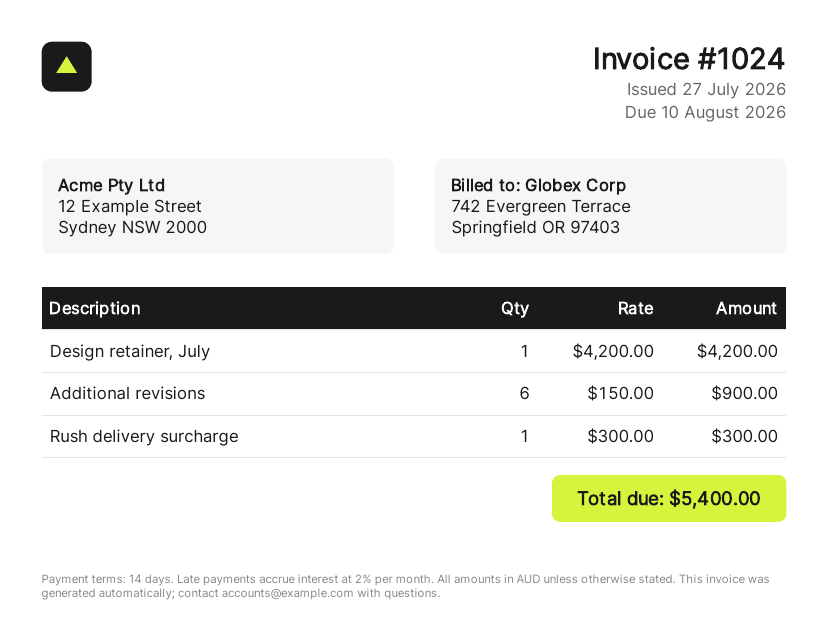
Download the Chromium-rendered PDF
Results at a glance
| Renderer | Version | Time | Peak memory | Output | Verdict |
|---|---|---|---|---|---|
| dompdf | 3.1.6 | 0.31s | 12 MB | 2 pages, layout collapsed | Flex/Grid unsupported |
| mpdf | 8.3.1 | 0.39s | 26 MB | 1 page, layout collapsed | Flex/Grid unsupported, SVG OK |
| TCPDF | 6.11.3 | 0.09s | 20 MB | 2 pages, unstyled | Deprecated by its own authors |
| Headless Chromium | 138 | 4.3s cold | ~250 MB | 1 page, pixel-perfect | Renders exactly what Chrome shows |
The three libraries are fast and light. They also all failed the same way, and understanding that failure is the key to choosing correctly.
dompdf: the default, and its ceiling
composer require dompdf/dompdfuse Dompdf\Dompdf;
use Dompdf\Options;
$options = new Options();
$options->set('isRemoteEnabled', true); // required for any remote image or font
$dompdf = new Dompdf($options);
$dompdf->loadHtml(file_get_contents('invoice.html'));
$dompdf->setPaper('A4');
$dompdf->render();
file_put_contents('invoice.pdf', $dompdf->output());What our invoice looked like coming out: the Flexbox header stacked vertically, the SVG logo disappeared entirely, the address blocks stacked instead of sitting side by side, and the CSS Grid line items exploded into full-width rows, four black header bars stacked on top of each other where a table header should be. The woff2 web font fell back to Helvetica. One page of HTML became two pages of PDF.
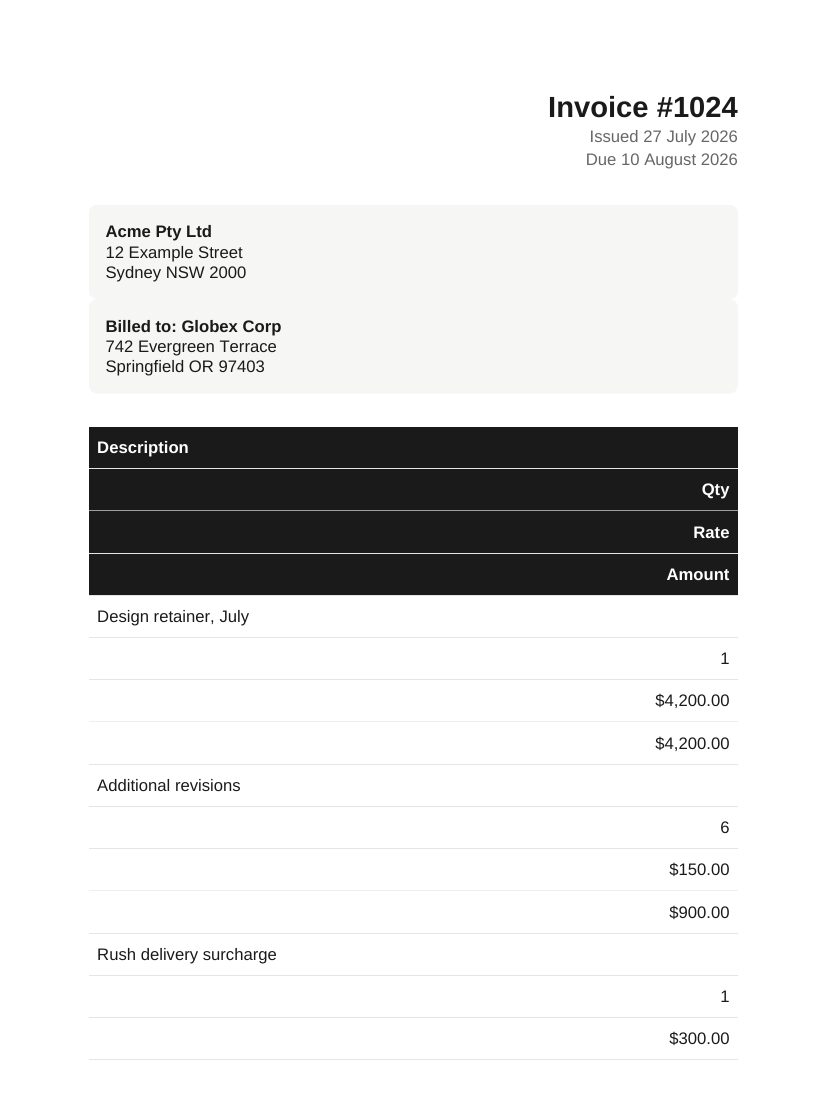
Page 1 of dompdf’s output. Download the full PDF
None of that is a bug. dompdf describes itself as “a CSS 2.1 compliant HTML to PDF converter”, and CSS 2.1 predates Flexbox, Grid, and woff2. It renders exactly what it promises; the promise just stops in about 2011.
What it did handle: background colours, border-radius, margins, page breaks, and standard fonts, quickly (0.31s) and in 12 MB of memory. The common gotchas all have real fixes:
- Images or fonts not loading: set
isRemoteEnabledtotrue(off by default for good security reasons: it lets the document fetch URLs from your server). - Layout collapsing: replace Flexbox and Grid with
<table>markup and floats. This is the big one, and it means maintaining a separate print template rather than reusing your web CSS. - Custom fonts: dompdf wants TTF or OTF files it can subset, not woff2. Host the TTF and reference it in
@font-face. - Content splitting awkwardly across pages:
page-break-inside: avoidon the blocks you care about (this one worked in our test).
mpdf: the best of the libraries
composer require mpdf/mpdf$mpdf = new \Mpdf\Mpdf(['format' => 'A4']);
$mpdf->WriteHTML(file_get_contents('invoice.html'));
$mpdf->Output('invoice.pdf', \Mpdf\Output\Destination::FILE);mpdf did noticeably better than dompdf on the same input: the inline SVG logo rendered correctly, rounded corners and backgrounds survived, text set in a clean bundled DejaVu face, and the whole thing stayed on one page. It cost a little more memory (26 MB peak) at about the same speed.
But the core failure was identical: no Flexbox, no Grid. The header stacked, the addresses stacked, and the line items collapsed into the same stacked-rows mess. mpdf’s own documentation is upfront that its CSS support is a subset centred on tables, floats, and block layout.
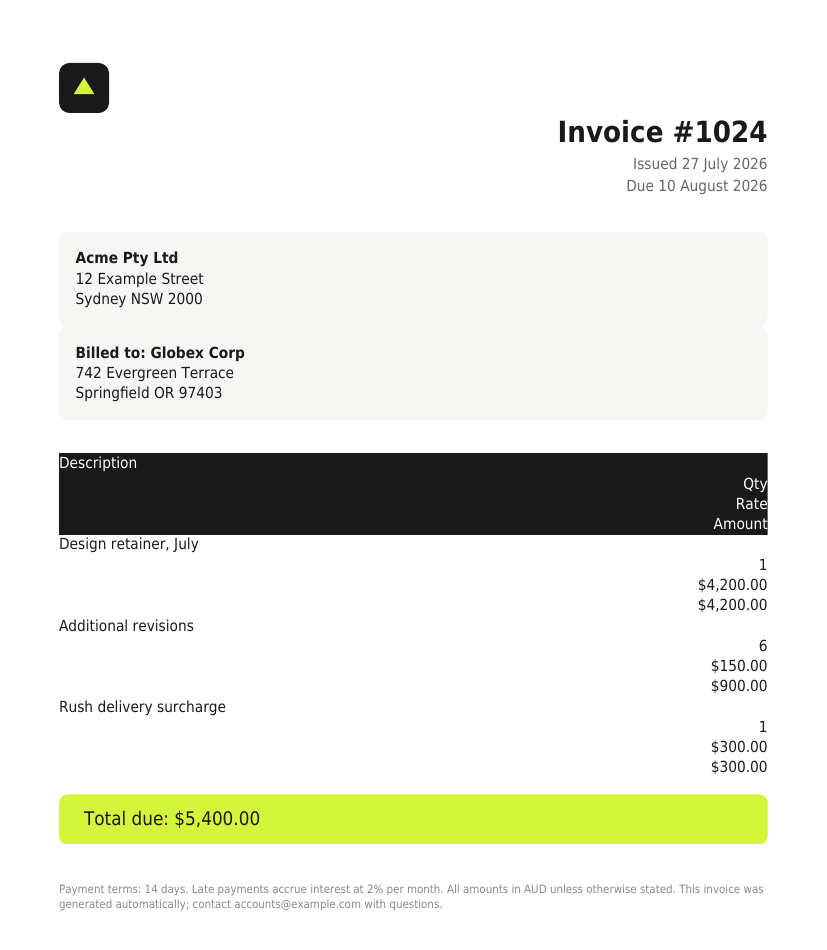
mpdf’s output: closer, but the layout is still 2011. Download the PDF
If you’re committed to a pure-PHP library and your documents involve non-Latin scripts, mpdf is also the strongest of the three on Unicode and RTL text, which is a genuine differentiator it inherited from its UFPDF lineage.
TCPDF: deprecated, and it watermarks
TCPDF deserves a warning more than a recipe. Its own Composer package description now reads “Deprecated legacy PDF engine for PHP”, with the authors pointing new projects at its successor library. On our invoice it produced the weakest output by far: no backgrounds, no rounded corners, no SVG, the total reduced to plain text, spread over two pages.
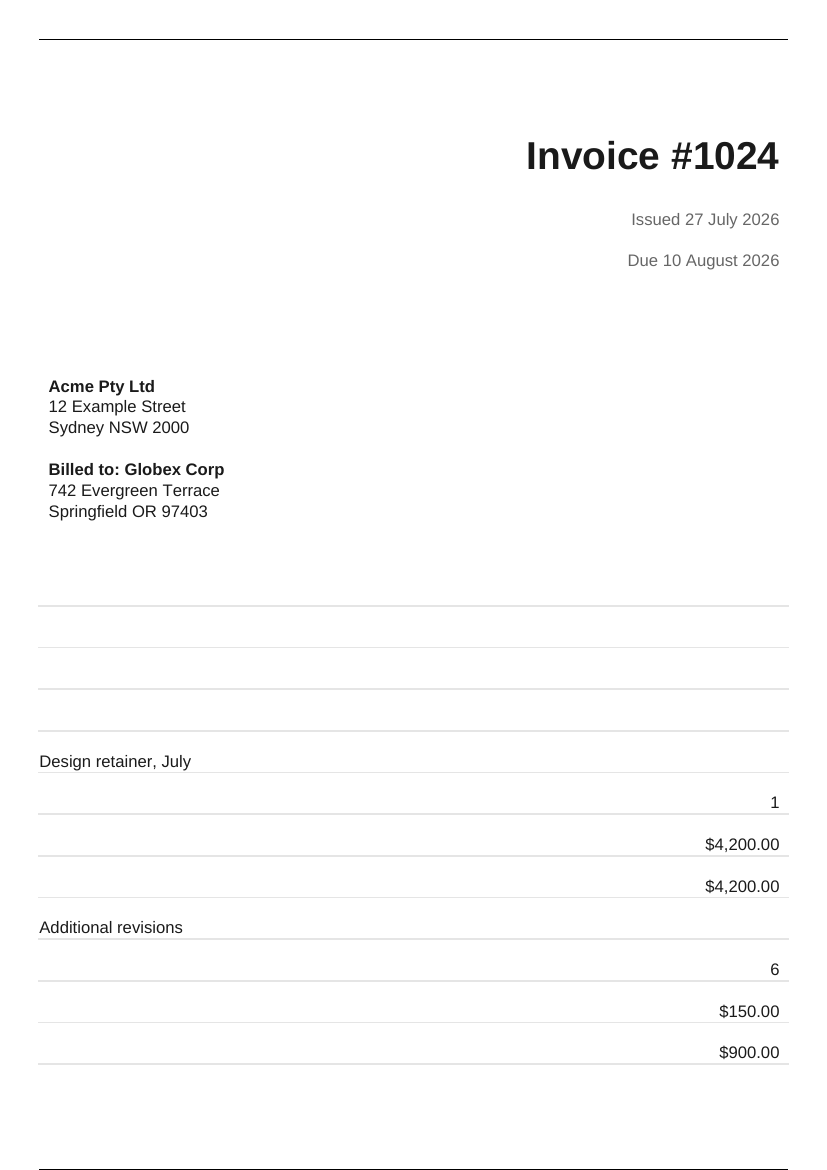
TCPDF’s output. Download the PDF, then try selecting the text below the last line on page 2.
It was also the only library that modified our document: every PDF it produces gets an invisible “Powered by TCPDF (www.tcpdf.org)” text layer with a clickable link on the last page. You won’t see it, but text extraction, screen readers, and copy-paste will. setPrintFooter(false) does not remove it, and there’s no public setter for it; the flag that controls it is protected and gets force-reset in the constructor. The only clean way out we found:
class CleanPdf extends TCPDF {
    public function __construct(...$args) {
        parent::__construct(...$args);
        $this->tcpdflink = false; // constructor resets this, so flip it after
    }
}
We verified that removes the hidden credit. But if you’re subclassing a deprecated library to stop it watermarking your invoices, it’s worth asking why it’s in the stack at all. For existing TCPDF codebases: it still works and it’s the fastest of the three (0.09s). For new projects: don’t.
Where the libraries win: simple HTML
Here’s the part most API-vendor blog posts skip. We rewrote the same invoice the way you’d have written it in 2010: <table> layout, floats, no web fonts, no SVG (here’s that version). Through dompdf: one clean page, correct side-by-side layout, styled totals, 0.17 seconds, 2 KB of output, 12 MB of memory. Genuinely good.
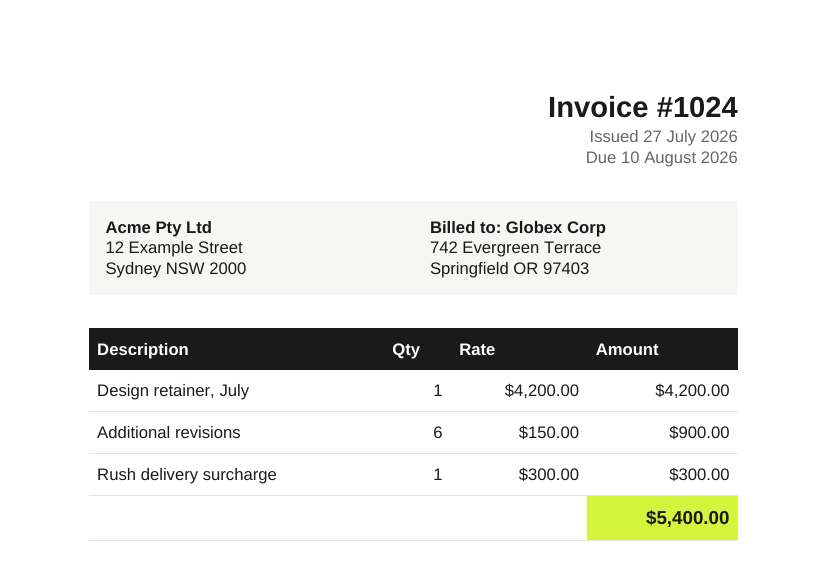
Same library, library-friendly markup. Download the PDF
If your PDF templates are few, simple, and fully under your control, and you’re willing to write them in library-safe HTML that nobody confuses with your web frontend, dompdf or mpdf is the right answer. Free, no infrastructure, no external dependency, milliseconds per document. A great many invoice systems need exactly this and nothing more.
The equation changes the moment any of these are true:
- The HTML comes from your web app’s templates, a CMS, a designer, or a customer.
- The layout uses anything newer than CSS 2.1 (in practice: any layout a frontend developer writes today).
- The document needs JavaScript to render (charts, for instance).
- People will put the PDF next to the same page in their browser and expect the two to match exactly.
Every dompdf troubleshooting query you’ll ever search, the missing images, the ignored Flexbox, the wrong fonts, the broken page breaks, traces back to one root cause: the library is reimplementing a browser’s rendering engine, and browsers moved faster. The fixes above are real, but they’re workarounds for that one fact.
Going deeper: charts and JavaScript
An invoice is the easy case. The documents that actually get requested in real products are ops reports, analytics exports, and customer-facing dashboards, and those have charts. Charts on the web are drawn by JavaScript into a canvas: Chart.js, ECharts, ApexCharts, Highcharts, all of them.
So we built a second test document: a quarterly operations report with stat tiles, a Chart.js bar chart, a two-series line chart, and a summary table (download report.html). Here’s Chromium’s render:
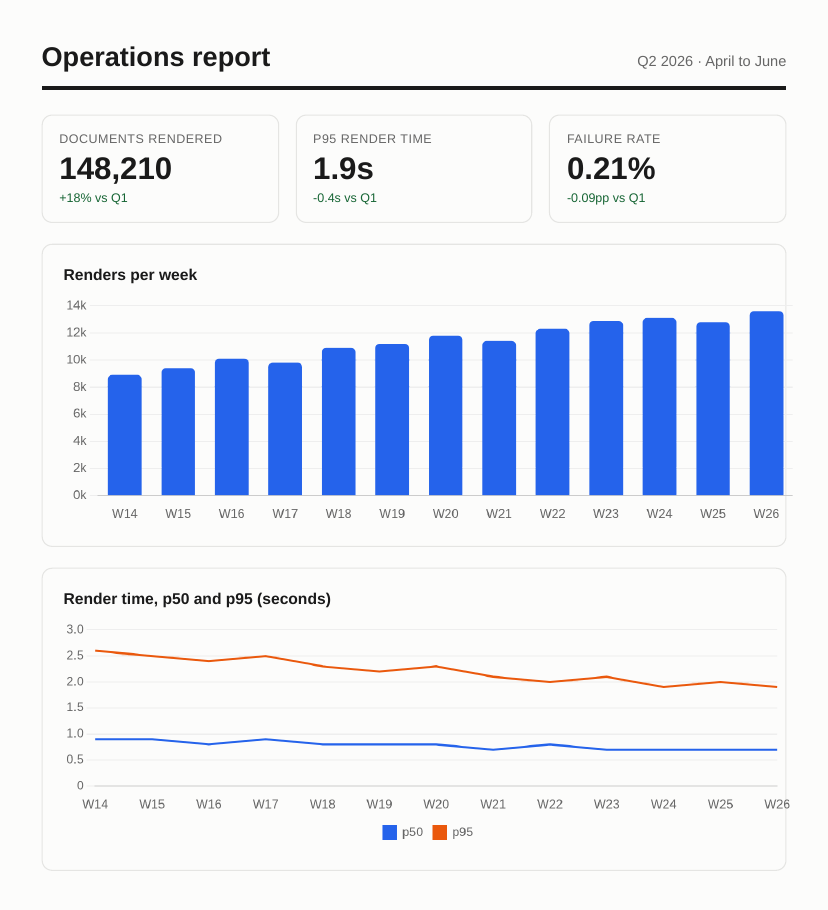
Download the Chromium-rendered PDF
And here’s the same document through mpdf, the best of the PHP libraries:
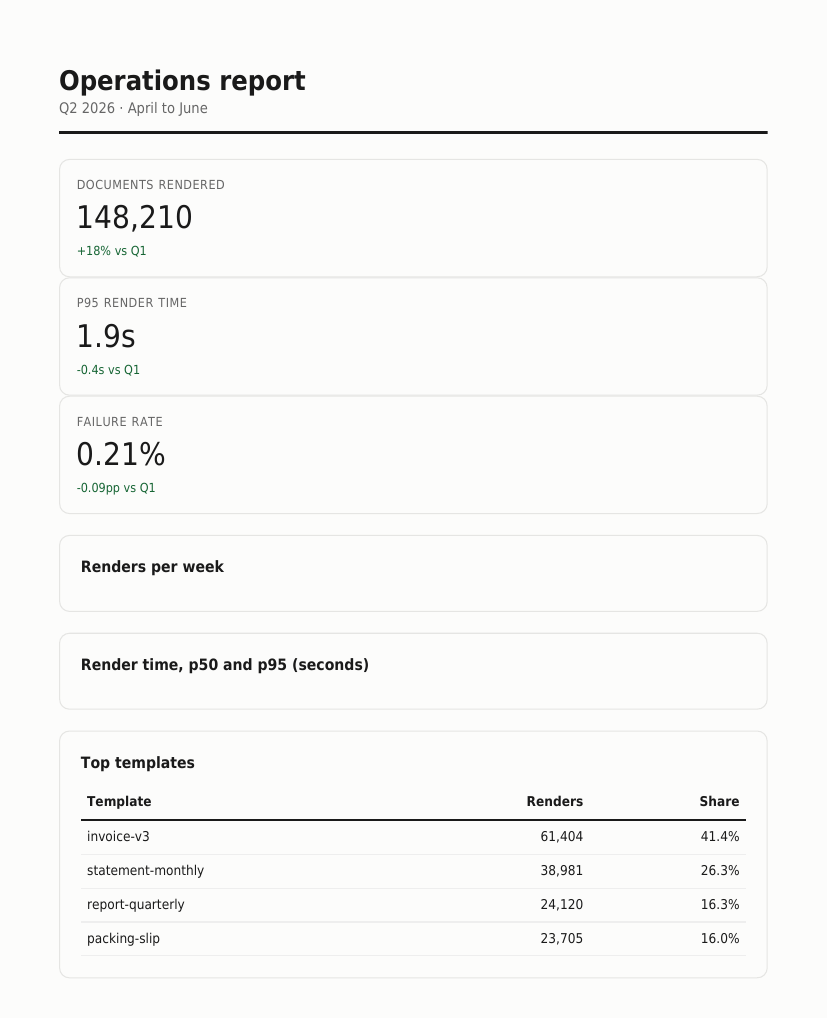
Empty boxes where the charts should be. dompdf does the same. Download mpdf’s PDF
This isn’t a CSS gap you can work around with table markup. The libraries don’t execute JavaScript at all, there’s no canvas, so a chart panel renders as its heading and an empty border. Your options for charts in a library-generated PDF are pre-rendering every chart to a PNG server-side (a second rendering pipeline to build and maintain) or not having charts. For anything dashboard-shaped, a browser engine isn’t the premium option, it’s the only option.
The browser way
Feed the identical modern invoice to headless Chromium and it renders pixel-identical to the browser: Flexbox header, Grid table, web font, SVG, one page. That’s not a fairer fight, it’s the same engine your designers tested against.
The catch is operational, not technical. You’re now running Chrome on a server: a ~130 MB binary, roughly 250 MB of memory per concurrent render, font packages, zombie-process management, and a queue so a traffic spike doesn’t fork-bomb the box. In PHP the usual wrapper is spatie/browsershot driving Puppeteer, which means Node alongside your PHP runtime. We’ve written about what that takes to run properly in our guide to modern HTML to PDF conversion.
If the volume justifies a dedicated rendering stack, that’s a fine path. If it doesn’t, this is the exact case for an API: browser-grade rendering, someone else runs the browsers.
// Render a URL to PDF via the Converterer capture API: plain curl, no SDK.
$ch = curl_init('https://api.converterer.com/jobs');
curl_setopt_array($ch, [
    CURLOPT_USERPWD => getenv('CONVERTERER_API_KEY') . ':',
    CURLOPT_POST => true,
    CURLOPT_POSTFIELDS => [
        'url' => 'https://yourapp.example/invoices/1024',
        'page_size' => 'A4',
        'file_name' => 'invoice-1024.pdf',
    ],
    CURLOPT_RETURNTRANSFER => true,
]);
$job = json_decode(curl_exec($ch), true);
// → ['id' => 'fe748521-…', 'status' => 'queued']
// The finished PDF lands in your destination; a webhook fires when it's ready.
Point it at the same invoice route your web app already serves (the API renders URLs, so your existing template, auth included via HTTP Basic if needed, just works). Margins, page size, headers and footers with page numbers, and wait conditions for JavaScript-heavy pages like the chart report above are all parameters on the same call; the website capture reference has the full list.
And rather than asking you to take that on faith: we ran both of this post’s test documents, the exact files linked above, through the production API.
curl -u "$CONVERTERER_API_KEY:" https://api.converterer.com/jobs \
  -d url="https://www.converterer.com/blog/html-to-pdf-php/invoice.html" \
  -d page_size=A4 -d file_name="api-invoice.pdf"

curl -u "$CONVERTERER_API_KEY:" https://api.converterer.com/jobs \
  -d url="https://www.converterer.com/blog/html-to-pdf-php/report.html" \
  -d page_size=A4 -d wait_network=true -d file_name="api-report.pdf"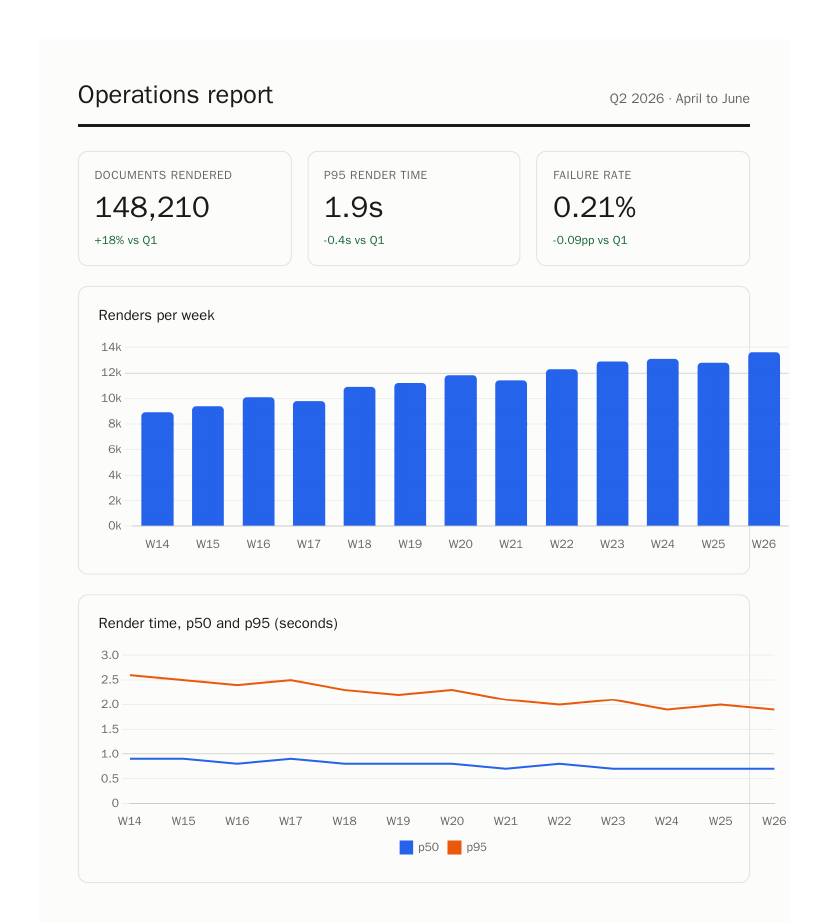
The API’s render of the chart report: wait_network=true gives Chart.js time to draw before capture. Backgrounds come through on the defaults, no extra flag needed. Download the API-produced PDFs: invoice, report, and compare them with the local Chromium renders above. The free tier covers 100 conversions a month, which is enough to find out whether the output matches what your browser shows. It will, because it’s the same engine.
Choosing in one paragraph
Simple documents, controlled templates, happy to write 2010-style HTML: dompdf (or mpdf if you need SVG, Unicode, or RTL). Existing TCPDF code: leave it, but don’t start there, and know about the hidden credit. Modern HTML, designer-built templates, JavaScript, or “must match the browser”: use a real browser engine, self-hosted via Puppeteer if the volume and ops appetite are there, or through the capture API if they’re not.